



Donki Coupon 2026: How to Get & Use the Don Quijote Coupon
- Written by: LIVE JAPAN Coupon & Deals Team
Show the live barcode at the register for up to 5% or 7% off with the Donki (Don Quijote) coupon, on top of the tax refund. No app or sign-up; screenshots are not accepted. Contains affiliate (ad) links.
Note: This page contains affiliate (advertising) links. LIVE JAPAN may earn a commission when you use the links or the coupon.
Don Quijote Coupon at a Glance
- Extra discount
- Up to 5% off at 11,000 yen or more, up to 7% off at 33,000 yen or more (tax included)
- Eligible purchases
- Tax-free (tax refund) purchases
- Tax refund
- Since November 1, 2026, tax-free works as a refund after customs verifies your departure. You can combine it with this coupon
- Stores
- About 600 Don Quijote, APITA and PIAGO stores across Japan
- What you need
- Your original passport (copies not accepted) and the live barcode screen of this coupon
- Sign-up / app
- Not required
- Please note
- No screenshots. Cannot be combined with other discounts or a majica card
Note: Show the live screen, connected to the internet, right before you pay. Screenshots are not accepted.
Japan’s Tax-Free System Changed to a Tax Refund on November 1
Since November 1, 2026, Japan’s tax-free system has changed from paying the tax-free price at the register to paying the tax-included price and receiving a refund after you leave. This coupon can be used under the new system.
- You pay the tax-included price at the register and keep your purchases until you leave Japan.
- At departure, before you check your baggage, customs verifies that you are taking the goods out of Japan, and the consumption tax is refunded after that. Verification must be completed within 90 days of purchase.
- How and where you register your refund details depends on the store and the refund service.
Don Quijote’s refund fee policy and the Visit Japan Web bag giveaway are covered in our separate guide.
Note: Details of the new system and Don Quijote’s handling may change. Please check the guide above for the latest information.
How to Get the Don Quijote Coupon
- 1. Tap the “Get the Don Quijote Coupon” button above to open the barcode screen.
- 2. Show that screen to the cashier before you pay.
- 3. If you want to use it later, bookmark the coupon page.
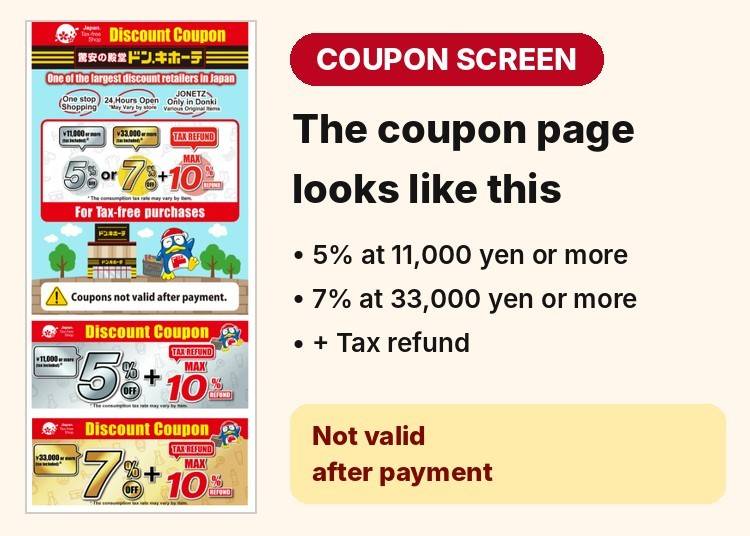
No sign-up, app download, or email registration is needed. You don’t have to get it before your trip; opening it at the register is enough. Screenshots are not accepted, so bookmark the page instead.
How to Use the Don Quijote Coupon: 4 Steps With the Cashier
The coupon screen asks you to go through STEP 1 to 4 together with the cashier. If you stop partway, the coupon may not be applied. Don’t tap through the screen on your own; move forward as the cashier scans.
First, Find the Tax-Free Counter
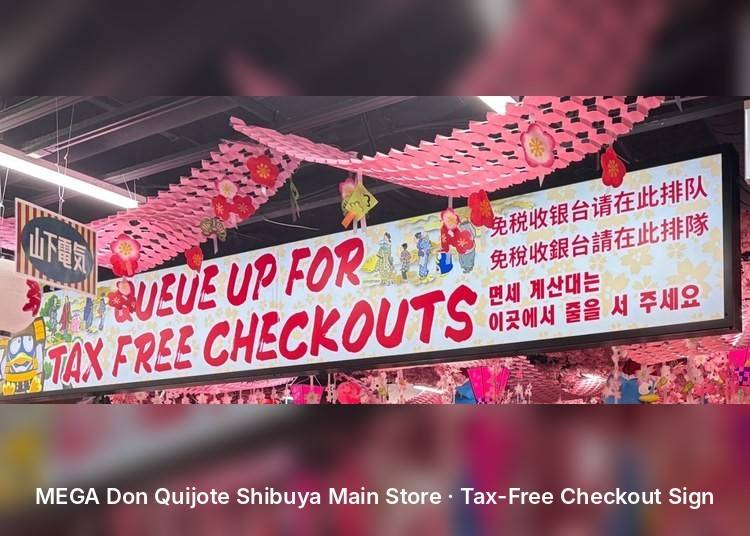
This coupon is for tax-free (refund) purchases. If the store has a “tax-free counter” sign, line up there. Counter locations and procedures differ by store.
STEP 1. Show the Screen and Have the First Barcode Scanned
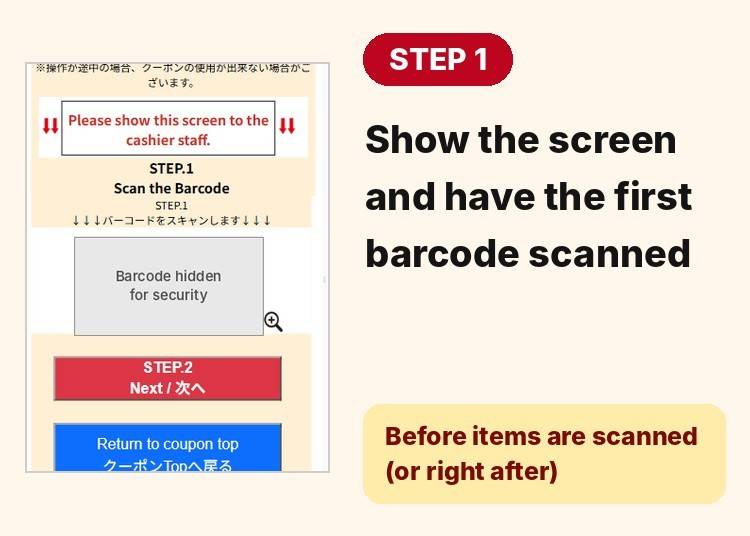
At the counter, before the cashier starts scanning your items (or right after they begin), show the coupon screen and have the STEP.1 barcode scanned. The coupon cannot be applied after payment is complete.
STEP 2. Tap “Next,” Then Choose “Yes” in the Confirmation Window
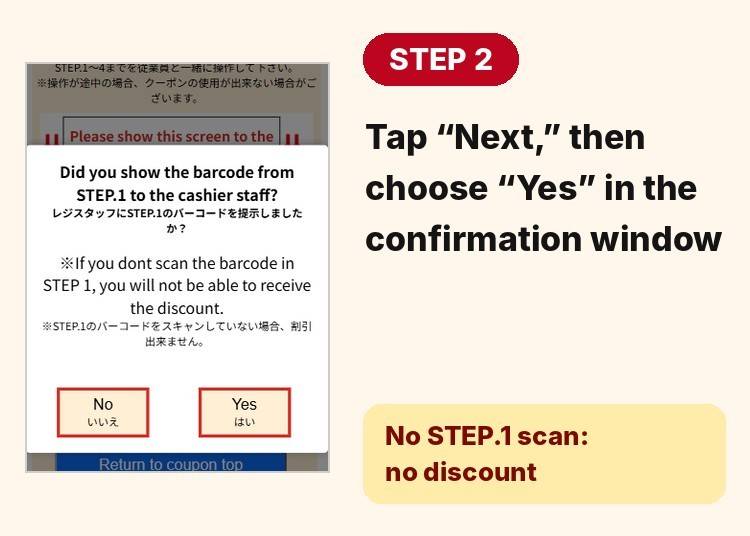
Once you have seen the STEP.1 barcode scanned, tap “Next.” A window asks, “Did you show the barcode from STEP.1 to the cashier staff?” If it was scanned, choose “Yes.” The window warns that without the STEP.1 scan, you will not receive the discount.
STEP 3. After the Cashier Presses “Subtotal,” Have the Second Barcode Scanned
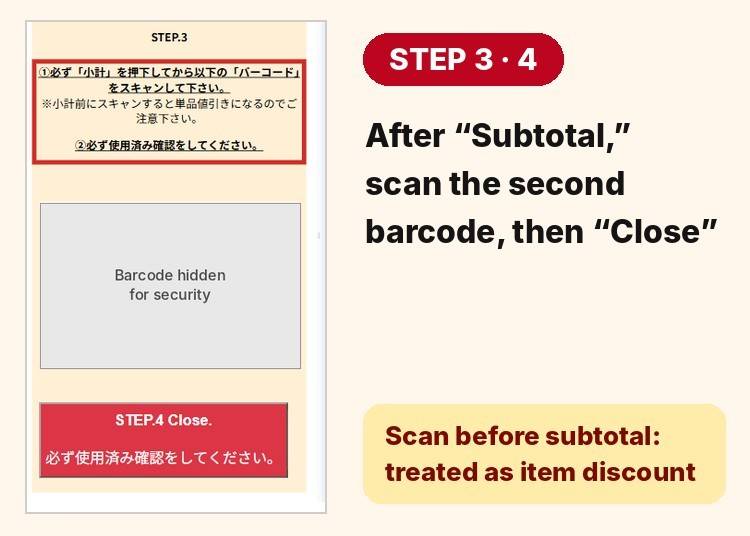
The STEP.3 screen shows guidance for the cashier in Japanese only. In short: (1) the cashier must press “Subtotal” (小計) first, and only then scan the barcode below; if it is scanned before the subtotal, it is processed as an item discount. (2) Be sure to complete the “used” confirmation (使用済み確認).
STEP 4. Tap “Close” to Finish
When the second barcode has been scanned, tap “Close” in STEP.4 to finish. The coupon is valid for one use only, and stopping partway can make it unusable.
Good to Know
- Bring your original passport (copies and photos are not accepted).
- Follow the store’s instructions for registering your refund details.
Rules and Restrictions Before You Use the Coupon
- Show it before you pay. The discount cannot be applied after payment is complete.
- Go through STEP 1 to 4 with the cashier. Stopping partway can make the coupon unusable.
- Have the second barcode scanned only after the cashier presses “Subtotal.” If it is scanned before the subtotal, it is processed as an item discount.
- Screenshots are not accepted. Connect to the internet and show the live screen right before you pay.
- Cannot be combined with other discounts, store coupons, or a majica card.
- Alcohol, cigarettes, POSA cards, game consoles, and some high-priced items are excluded.
- The coupon is valid for one use only.
- If your purchase includes items at the reduced tax rate, the eligible amount may differ.
The full terms and the complete list of excluded items are on the coupon page.
Frequently Asked Questions (FAQ)
- How do I get the Don Quijote coupon?
- Tap the “Get the Don Quijote Coupon” button on this page to open the barcode screen. At the register, show the screen to the cashier before you pay and have the barcodes scanned. If you want to use it later, bookmark the coupon page.
- Do I need to sign up or install an app to use the coupon?
- No. You can use it right away by tapping the button, with no login, app, or email registration.
- Can I use a screenshot of the coupon?
- No. You need to show the live screen, connected to the internet, right before you pay.
- What are the discount rates and minimum purchase amounts?
- You get up to 5% off for purchases of 11,000 yen or more and up to 7% off for purchases of 33,000 yen or more (tax included). If your purchase includes items at the reduced tax rate, the eligible amount differs. Paying together with your travel companions makes it easier to reach the higher tier.
- How many barcodes are scanned, and what happens if I do it in the wrong order?
- The coupon screen has two barcodes. The first (STEP.1) is scanned before or right after the cashier starts scanning your items. The second (STEP.3) is scanned after the cashier presses “Subtotal.” If it is scanned before the subtotal, it is processed as an item discount, and without the first barcode scan you cannot get the discount.
- Can I get the tax refund and the coupon discount together?
- Yes. Show your passport and the coupon screen at the register. Under the system that started on November 1, the tax refund is issued after customs verification when you leave Japan.
- Can I still use this coupon under the tax refund system that started on November 1?
- Yes. The coupon can be used under the tax refund system in effect since November 1, 2026. For how the system works and how Don Quijote handles it, see our Don Quijote tax refund guide.
- Are there items the coupon doesn’t apply to?
- Yes. Alcohol, cigarettes, POSA cards, game consoles, and Apple products and some other high-priced brands are excluded. See the coupon page for the full list.
- What if the coupon page won’t load or the barcode won’t scan?
- Try connecting to the free in-store Wi-Fi, “DONKI_Free_Wi-Fi” (offered at most stores). If the barcode won’t scan, turn your screen brightness to maximum, reload the page, or try another register.
- Are the Donki coupon and the Don Quijote coupon the same?
- Yes. “Donki” is the common short name for Don Quijote. This one coupon works at Don Quijote, MEGA Don Quijote, APITA and PIAGO stores, about 600 stores nationwide.
- Is Don Quijote tax-free, and what is the minimum purchase for tax-free shopping?
- Yes. Don Quijote offers tax-free shopping for visitors, and since November 1, 2026 it works as a tax refund. As a general national rule, the minimum is 5,000 yen before tax at the same store on the same day (as of October 27, 2026; see our tax refund guide). The coupon has its own thresholds: 11,000 yen and 33,000 yen, tax included.
Get the Don Quijote Coupon
More Reading
- Don Quijote (Donki) Tax Refund from Nov 1, 2026: No Refund Service Fee
- Japan’s New Tax-Free System: Company & Airport Guide
- Japan Tax-Free System: Complete Guide
- 32 Must-Buy Items at MEGA Don Quijote Shibuya in 2026: Gadgets, Cosmetics, Snacks & More (+Bonus Coupon)
- Complete 2026 Guide to MEGA Don Quijote Shibuya (+Bonus Coupon)
Note: This article reflects information as of November 13, 2026. Discount rates, eligible amounts, and participating stores may change without notice. Please check the coupon page for the latest details before you visit.

We help travelers save money while shopping and using services in Japan. Our team gathers the latest tax-free deals and discounts from trusted partners and explains them simply so you can shop smarter and stretch your travel budget further. (Note: This article includes promotional content from partner companies. Live Japan may earn a commission from the use of links or coupons provided.) Information Provided by Partner Companies:Don Quijote (PPIH), BicCamera, AEON MALL, Mitsui Fudosan Retail Management, Tsuruha Drug, Lotte Duty Free, EDION, Laox, Satudora, Japan Duty Free Fa-So-La Mitsukoshi Isetan, Odakyu Department Store, Takeya, Sundrug, AOKI, Joshin, Nippon Rent-A-Car, Yamada Denki, Smahospital, Snow Peak
- Category
*Prices and options mentioned are subject to change.
*Unless stated otherwise, all prices include tax.
Popular Tours & Activities
Recommended places for you
-
Appealing

Rukku and Uohei
Izakaya
Sapporo / Chitose
-

Jukuseiniku-to Namamottsuarera Nikubaru Italian Nikutaria Sannomiya
Izakaya
Kobe, Sannomiya, Kitano
-
Goods
Yoshida Gennojo-Roho Kyoto Buddhist Altars
Gift Shops
Nijo Castle, Kyoto Imperial Palace
-

Ameyoko Shopping Street
Old Towns (Shitamachi)
Ueno
-

ISHIDAYA Hanare
Yakiniku
Kobe, Sannomiya, Kitano
-

Hirosaki Park
Parks
Aomori, Hirosaki And Hachinohe
-
[Starting Spring 2027] Japan's Railways Evolve Further! Why Tickets Are Changing to "QR Tickets" and a Riding Guide for Foreign Visitors
by: Guest Contributor
-
28 Best Things to Do in Odaiba (2026 Updated): Tokyo's Entertainment Island
-

5 Stationery Shops in Shinjuku: One Walking Route for Art Supplies, Suica Penguin Gifts, and More
-
BicCamera Tax Refund 2026: Refund Service Fee 0 Yen
-
Cracked Phone Screen in Japan? Smahospital Repair Guide: Keep Your Data, Fixed in 15 Min, Multilingual Support | Up to 10,000 Yen Off with LIVE JAPAN Coupon
-
(Japan Travel Etiquette) Eyes Up! Why You Shouldn't Walk and Scroll in Japanese Train Stations
by: Guest Contributor
-

Taking a Break in Shinjuku: Four Secret Spots to Rest, Relax, and Refresh Yourself
-

5 Must-Visit Nara Temples and Shrines: Discover the Timeless Beauty of Japan's Ancient Capital
by: WESTPLAN
-

Akita Bucket List: 20 Best Things to Do in Akita Prefecture For Tourists (Attractions, Local Foods & Activities)
-

JR Edition: Visit all of Tokyo in one Day with the Tokyo Metropolitan District Pass!
-

[2026] Don Quijote Opens New Store on Shijo-dori, Kyoto! Experience Exclusive "Fruit Skewers" at Kansai's First Inbound-Focused Store
-

Get Japanese Stationery! 10 Recommended Stationery Items for 2020 at Loft Shinjuku Mylord
- #best sushi japan
- #what to do in odaiba
- #what to bring to japan
- #new years in tokyo
- #best ramen japan
- #what to buy in ameyoko
- #japanese nail trends
- #things to do japan
- #onsen tattoo friendly tokyo
- #daiso
- #best coffee japan
- #best japanese soft drinks
- #best yakiniku japan
- #japanese fashion culture
- #japanese convenience store snacks